 . A new row will appear in the table.
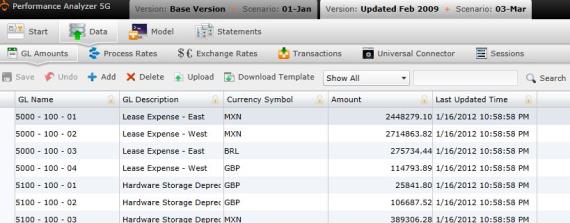
 The General Ledger screen lists the collection of accounts that support the value items in your company's major financial statements, and usually belong to one of seven categories--assets, liabilities, equity, revenue, expense, gains, and loss.
You can navigate to the G eneral Ledger selecting "Data" on the Main Menu, then "General Ledger."
The General Ledger screen under "Business Rules" is NOT the same screen as the one found under "Data." The screen found under "Business Rules" is a list of accounts. The General Ledger screen under "Data" lists individual items.
To add a general ledger manually:
. A new row will appear in the table. The General Ledger table contains the following columns:
 to save the new general ledger item.
To upload files:
 . A download pop-up screen will appear. Make your selections and select "OK."
 . The "Upload" panel will open. .
What if the records fail to upload?See Edit Failed Records.
Select  at any time to delete any changes you have made. Select
  to delete an entire process.
Related Topics: